---
title: Receiving information about traffic volume
description: Warning! The following instruction is intended for the second generation of HTTP module! If we want to use the information on the time needed to travel from home to work, school or other selected plac
---
[Skip to content](https://knowledgebase.grenton.com/en/gate-http-receiving-information-about-traffic-volume#main-content)
English
Show submenu for translations
[New ticket](https://knowledgebase.grenton.com/en/kb-tickets/new?hsLang=en) [Customer portal](https://knowledgebase.grenton.com/wsparcie?hsLang=en)
![Logo\_Grenton\_Main\_2020\_RGB\_v1.0-1.png\]](https://knowledgebase.grenton.com/hs-fs/hubfs/Logo_Grenton_Main_2020_RGB_v1.0-1.png?width=200&height=94&name=Logo_Grenton_Main_2020_RGB_v1.0-1.png)
Open main navigation
Close main navigation
- English
Show submenu for translations
- [New ticket](https://knowledgebase.grenton.com/en/kb-tickets/new)
- [Customer portal](https://knowledgebase.grenton.com/wsparcie)
- [Trainings](https://www.grenton.com/cooperation/trainings.html)
[Trainings](https://www.grenton.com/cooperation/trainings.html)
Hello. How can we help you?
- There are no suggestions because the search field is empty.
1. [Knowledge Base](https://knowledgebase.grenton.com/en?hsLang=en)
2. [Manuals](https://knowledgebase.grenton.com/en/manuals?hsLang=en)
3. [Gate HTTP](https://knowledgebase.grenton.com/en/manuals?hsLang=en#gate-http)
# Receiving information about traffic volume
**Warning!** The following instruction is intended for the second generation of HTTP module!
If we want to use the information on the time needed to travel from home to work, school or other selected place in the system, we can use an external service for this purpose, e.g.:
[https://developer.tomtom.com/routing-api](https://developer.tomtom.com/routing-api)
According to the example on: [https://developer.tomtom.com/routing-api/routing-api-documentation-routing/calculate-route](https://developer.tomtom.com/routing-api/routing-api-documentation-routing/calculate-route)
the API query looks as following:
API call: https://baseURL/routing/versionNumbercalculateRoute/locations/contentType?key=Your\_API\_Key
Below is presented how you can easily obtain this information:
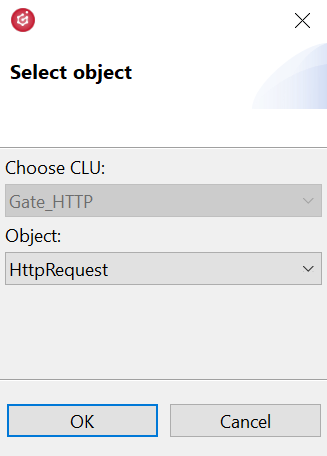
- Create the HttpRequest periphery object:
- The following parameters should be set in the HttpRequest object:
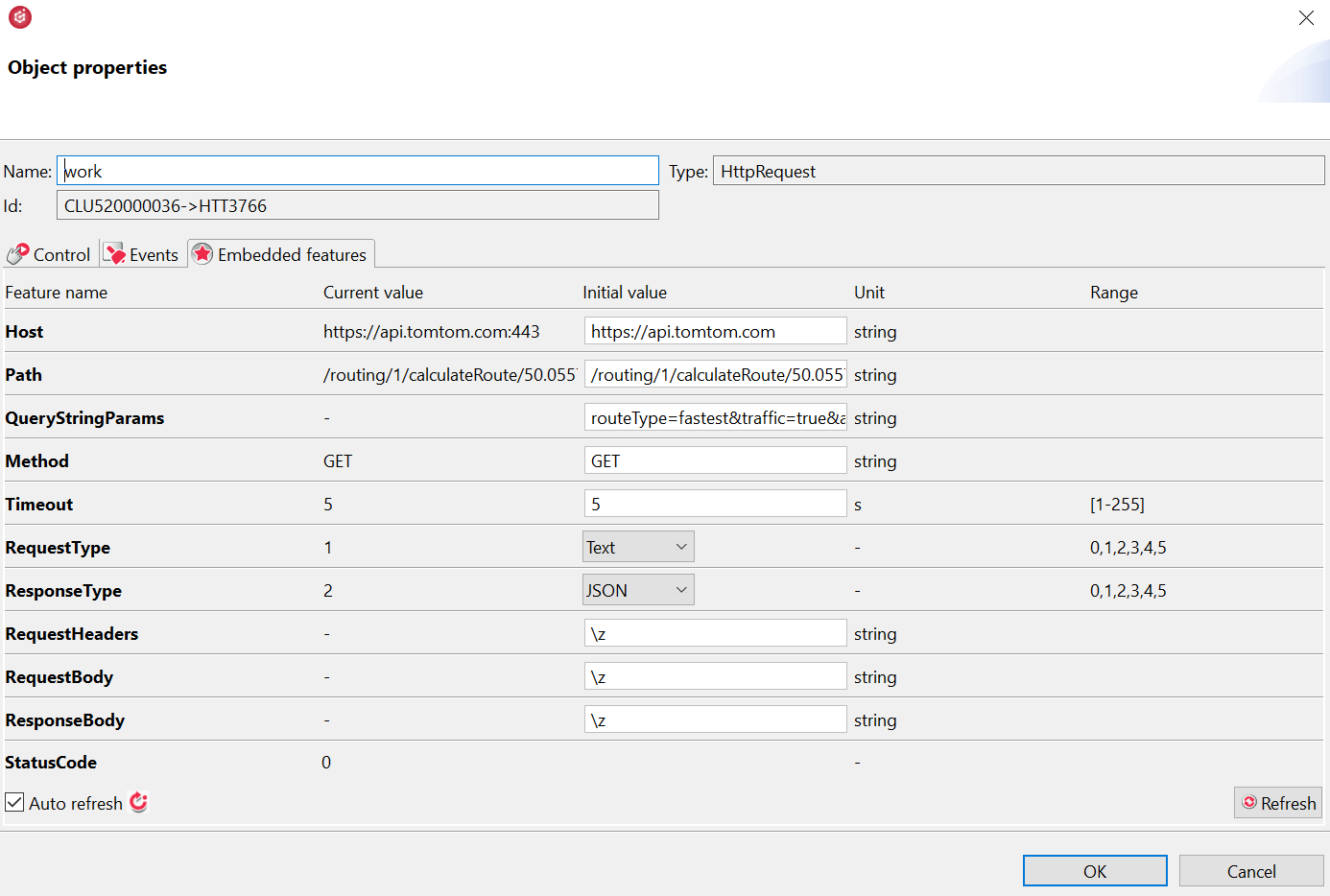
Where:
**Host:** **[https://api.tomtom.com](https://api.tomtom.com/)**
**Path:** **/routing/1/calculateRoute/50.055718,19.930863:50.067358,19.871613/json**
**QueryStringParams:** **routeType=fastest&traffic=true&avoid=unpavedRoads&travelMode=car&key=Your\_API\_Key**
**Warning!** The api key is obtained after creating an account at: [https://developer.tomtom.com/user/register](https://developer.tomtom.com/user/register).
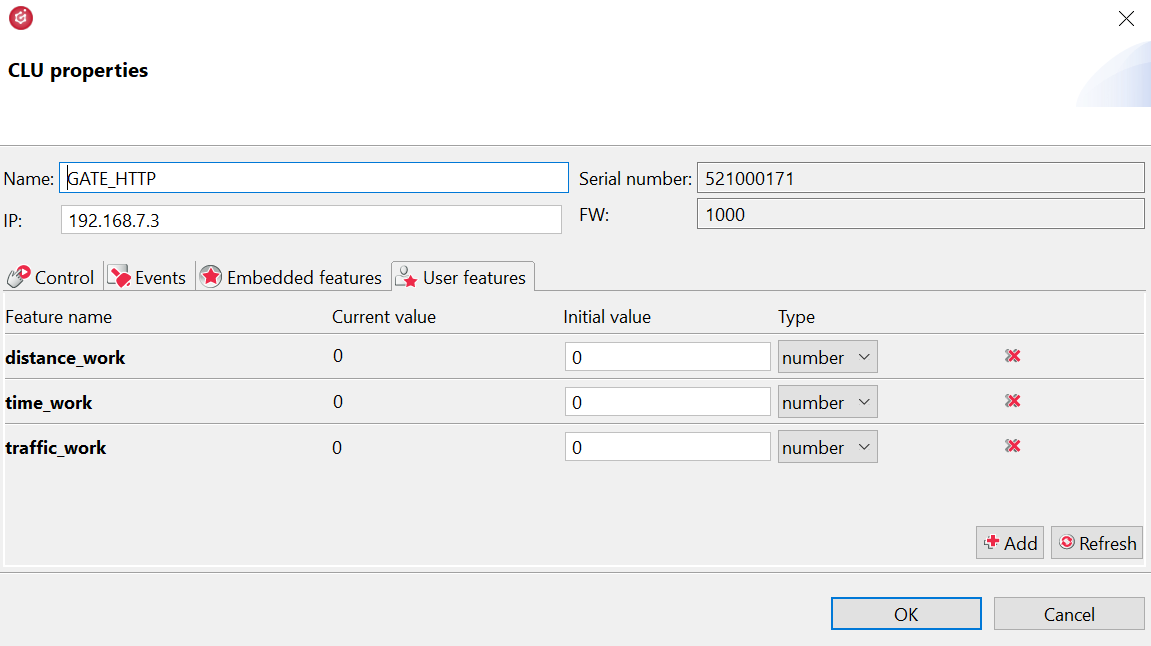
- The next step is to create user features of the number type:
- Then prepare the script:
```
local resp = GATE_HTTP->work->ResponseBody GATE_HTTP->distance_work = resp.routes[1].summary.lengthInMeters GATE_HTTP->time_work = resp.routes[1].summary.travelTimeInSeconds GATE_HTTP->traffic_work = resp.routes[1].summary.trafficDelayInSeconds
```
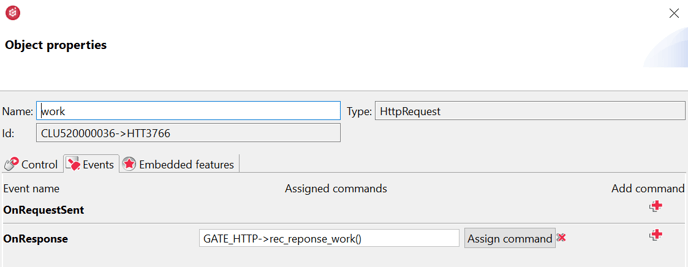
- Assign the script to the **OnResponse** event in the HttpRequest periphery object:
- Then, the configuration should be sent to the CLU.
- After the configuration has been successfully sent, the **SendRequest** method should be called in the Control tab of the HttpRequest periphery object:
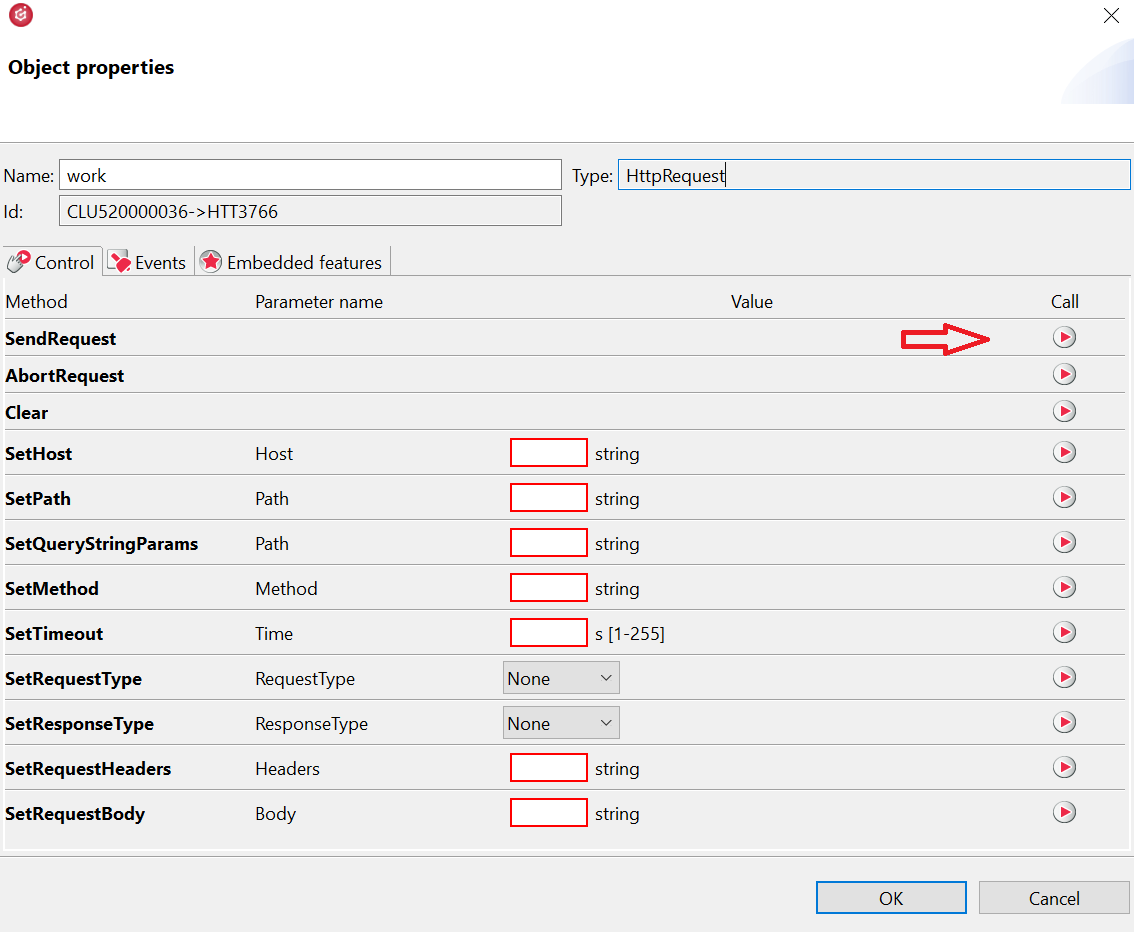
- After calling the method, the **StatusCode** feature should receive the value 200: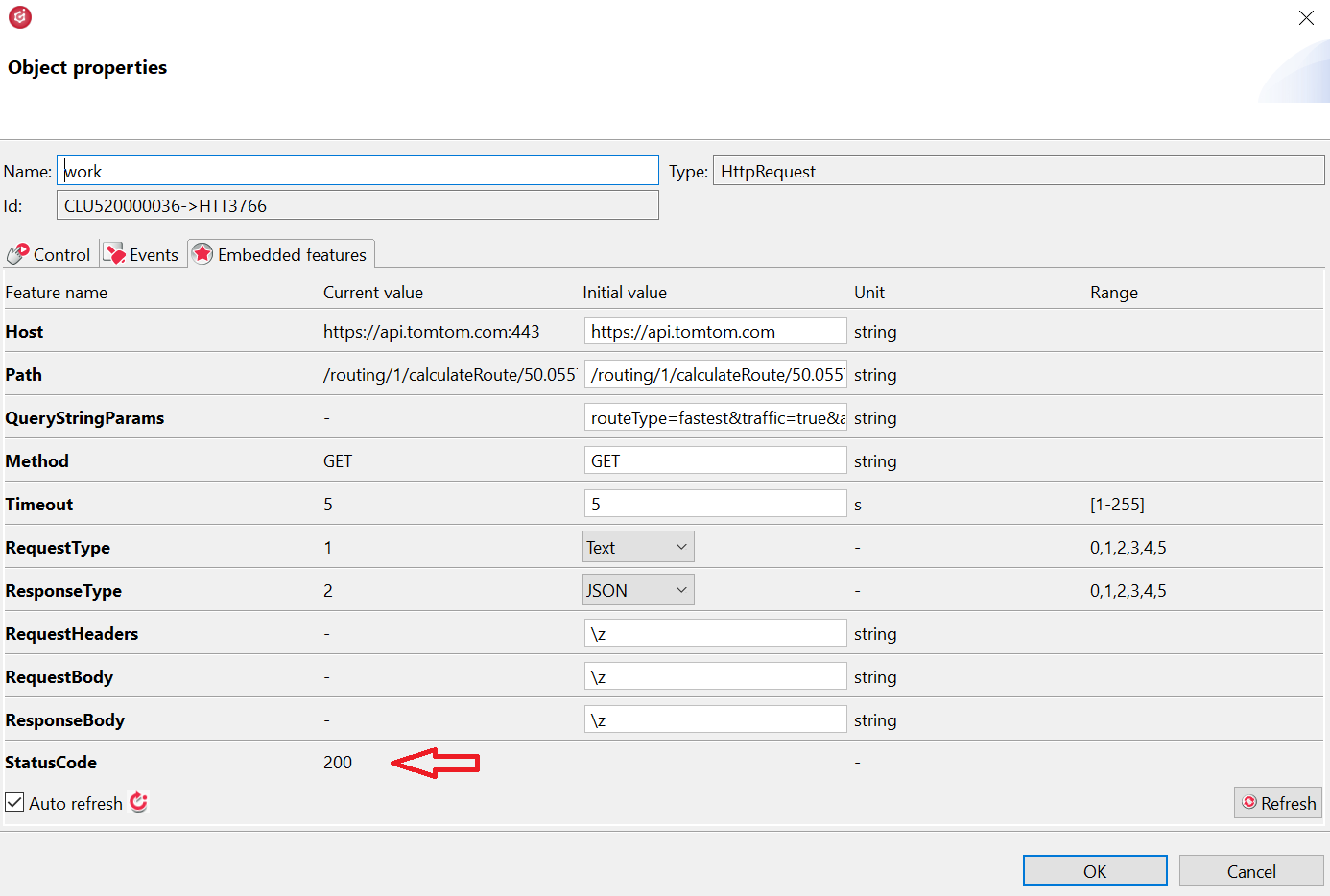
- User features values should receive appropriate values.
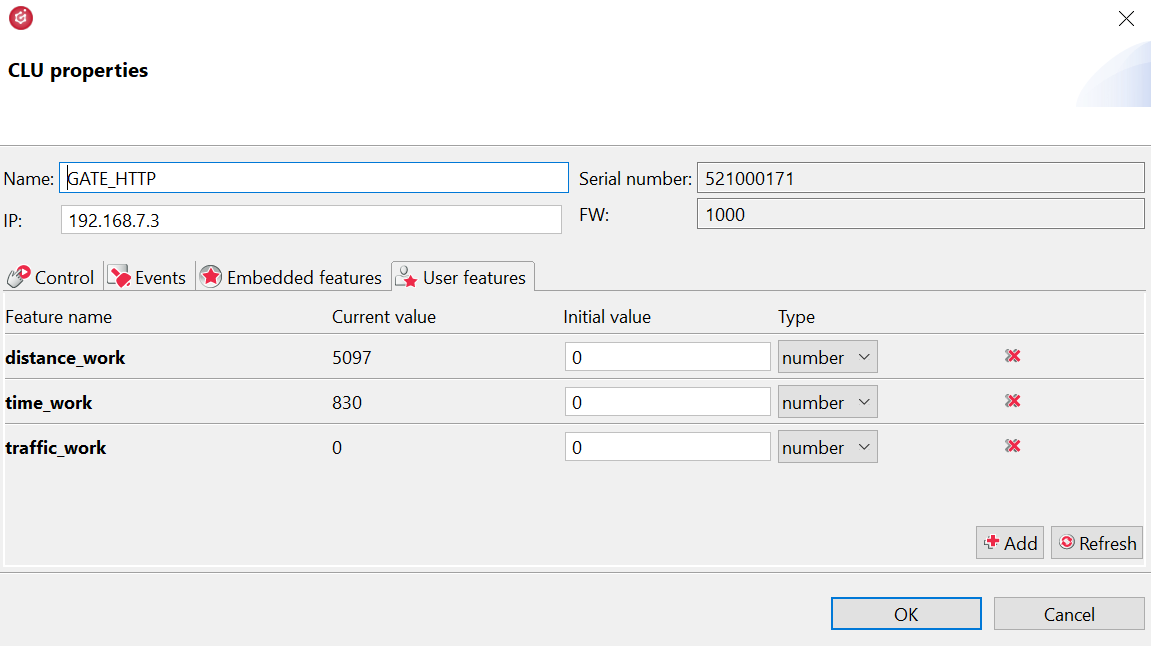
- To verify received information, it is possible to paste query to an internet browser and compare:
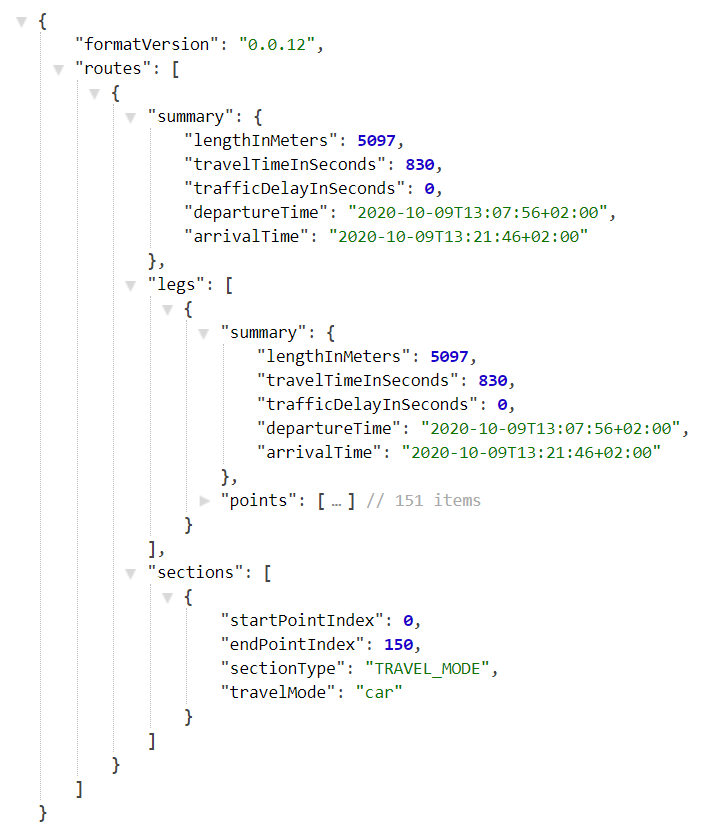
- The obtained data can be displayed in the mobile application and Smart Panel or use to create logic in the system.

- [Installation guidelines](https://knowledgebase.grenton.com/en/installation-guidelines?hsLang=en#main-content)
- [How to Prepare Electrical Installation](https://knowledgebase.grenton.com/en/installation-guidelines?hsLang=en#how-to-prepare-electrical-installation)
- [Reference devices](https://knowledgebase.grenton.com/en/reference-devices?hsLang=en#main-content)
- [Integrated Device](https://knowledgebase.grenton.com/en/reference-devices?hsLang=en#integrated-device)
- [Most Common Mistakes](https://knowledgebase.grenton.com/en/most-common-mistakes?hsLang=en)
- [Electrical Installation](https://knowledgebase.grenton.com/en/electrical-installation?hsLang=en)
- [Manuals](https://knowledgebase.grenton.com/en/manuals?hsLang=en#main-content)
- [Gate Modbus](https://knowledgebase.grenton.com/en/manuals?hsLang=en#gate-modbus)
- [Training](https://knowledgebase.grenton.com/en/manuals?hsLang=en#training)
- [SW Applications](https://knowledgebase.grenton.com/en/manuals?hsLang=en#sw-applications)
- [Gate HTTP](https://knowledgebase.grenton.com/en/manuals?hsLang=en#gate-http)
- [Smart Panel](https://knowledgebase.grenton.com/en/manuals?hsLang=en#smart-panel)
- [Configuration](https://knowledgebase.grenton.com/en/manuals?hsLang=en#configuration)
- [myGrenton interfaces](https://knowledgebase.grenton.com/en/manuals?hsLang=en#mygrenton-interfaces)
- [Virtual Objects](https://knowledgebase.grenton.com/en/manuals?hsLang=en#virtual-objects)
- [Gate Alarm](https://knowledgebase.grenton.com/en/manuals?hsLang=en#gate-alarm)
- [Intercom](https://knowledgebase.grenton.com/en/intercom?hsLang=en)
- [FAQ](https://knowledgebase.grenton.com/en/faq?hsLang=en#main-content)
- [FAQ](https://knowledgebase.grenton.com/en/faq?hsLang=en#faq)
- [About Grenton](https://knowledgebase.grenton.com/en/faq?hsLang=en#about-grenton)
- [Price list and documents](https://knowledgebase.grenton.com/en/price-list-and-documents?hsLang=en)
[](http://grenton.com)
Copyright © 2026, Grenton Sp.z o.o.