---
title: Sterowanie adresowalnymi paskami LED na przykładzie integracji z modułem E-NODE AM-8.3
description: "Celem niniejszego artykułu jest przedstawienie sposobu sterowania adresowalnymi paskami LED na przykładzie integracji z modułem E-NODE AM-8.3. Integracja ta pozwala na: Do zrealizowania poniższego prz"
---
[Przejdź do treści](https://knowledgebase.grenton.com/pl/steorwanie-adresowalnymi-paskami-led-na-przykładzie-integracji-z-modułem#main-content)
Polski
Pokaż podmenu do tłumaczenia
[Nowe zgłoszenie](https://knowledgebase.grenton.com/pl/kb-tickets/new?hsLang=pl) [Portal klienta](https://knowledgebase.grenton.com/wsparcie?hsLang=pl)
![Logo\_Grenton\_Main\_2020\_RGB\_v1.0-1.png\]](https://knowledgebase.grenton.com/hs-fs/hubfs/Logo_Grenton_Main_2020_RGB_v1.0-1.png?width=200&height=94&name=Logo_Grenton_Main_2020_RGB_v1.0-1.png)
Otwórz główne menu nawigacji
Zamknij główne menu nawigacji
- Polski
Pokaż podmenu do tłumaczenia
- [Nowe zgłoszenie](https://knowledgebase.grenton.com/pl/kb-tickets/new)
- [Portal klienta](https://knowledgebase.grenton.com/wsparcie)
- [Szkolenia](https://szkolenia.grenton.pl/)
[Szkolenia](https://szkolenia.grenton.pl/)
Witaj. Jak możemy Ci pomóc?
- Brak sugerowanych wyników, ponieważ pole wyszukiwania jest puste.
1. [Baza wiedzy](https://knowledgebase.grenton.com/pl?hsLang=pl)
2. [Konfiguracja i Integracje](https://knowledgebase.grenton.com/pl/konfiguracja-i-integracje?hsLang=pl)
3. [Gate HTTP](https://knowledgebase.grenton.com/pl/konfiguracja-i-integracje?hsLang=pl#gate-http)
# Sterowanie adresowalnymi paskami LED na przykładzie integracji z modułem E-NODE AM-8.3
Celem niniejszego artykułu jest przedstawienie sposobu sterowania adresowalnymi paskami LED na przykładzie integracji z modułem ***E-NODE AM-8.3***.
Integracja ta pozwala na:
- Uruchomienie zaprogramowanej sceny na module
- Zmianę jasności
Do zrealizowania poniższego przykładu potrzebujemy:
- ***Gate HTTP*** (o nazwie ***HTTP***)
- Moduł ***[E-NODE AM-8.3](http://www.sigma.net.pl/index.php?go=pok&id=15&tow=25&from=kat)***
- Pasek adresowalny
Dokumentacja do modułu ***E-NODE AM8.3*** znajduje się [tutaj](http://www.sigma.net.pl/down/instrukcja%20E-NODE%20AM-8.3%20MK2%20v2.0.pdf)
**Tworzenie cech użytkownika**
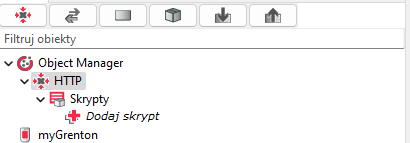
1\. Dwukrotnie kliknij w obiekt ***HTTP***, aby wejść do ustawień modułu:
2\. Przejdź do zakładki ***Cechy użytkownika*** i stwórz potrzebne cechy*:*
- ***WybranyProgram*** - Wartość początkowa: ***0*** Typ: ***number***
- ***Jasnosc*** - Wartość początkowa: ***255*** Typ: ***number***
**Konfiguracja obiektów wirtualnych**
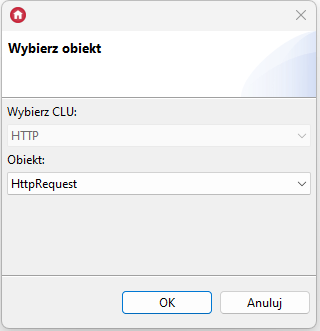
1\. Na module ***Gate HTTP*** dodajemy obiekt wirtualny ***HttpRequest***:
2\. Wpisujemy nazwę obiektu: ***ZmianaJasnosci\_Request*** i uzupełniamy wartości cech wbudowanych obiektu:
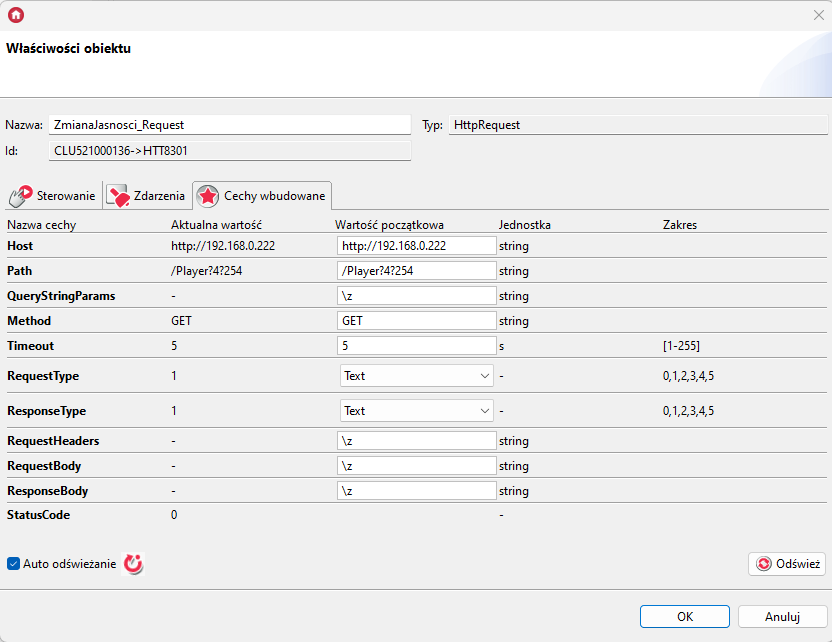
**Host:** http://192.168.0.222 (adres IP konwertera)
**Path:** /Player?4?254
3\. Na module ***Gate HTTP*** dodajemy kolejny obiekt wirtualny ***HttpRequest***:

4\. Wpisujemy nazwę obiektu: ***WyborTrybu\_Request*** i uzupełniamy wartości cech wbudowanych obiektu:
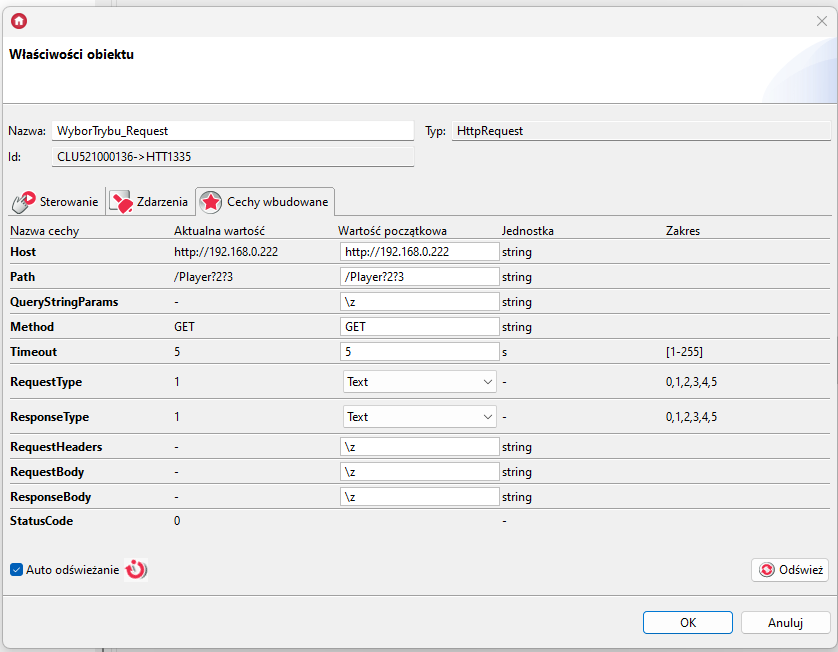
***Host*:** http://192.168.0.222 (adres IP konwertera)
***Path*:** /Player?2?3
5\. Na module ***Gate HTTP*** dodajemy kolejny obiekt wirtualny ***HttpRequest***:

6\. Wpisujemy nazwę obiektu: ***OdczytStanu*** i uzupełniamy wartości cech wbudowanych obiektu:
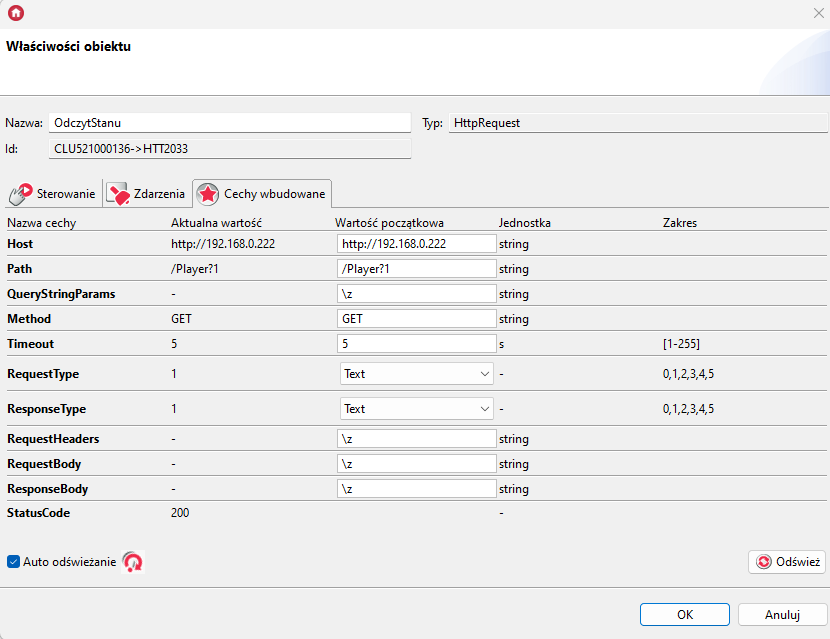
***Host***: http://192.168.0.222 (adres IP konwertera)
***Path***: /Player?1
7\. Na module ***Gate HTTP*** dodajemy obiekt wirtualny ***Timer***:
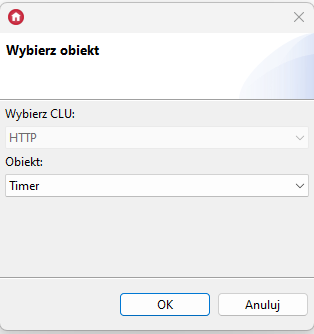
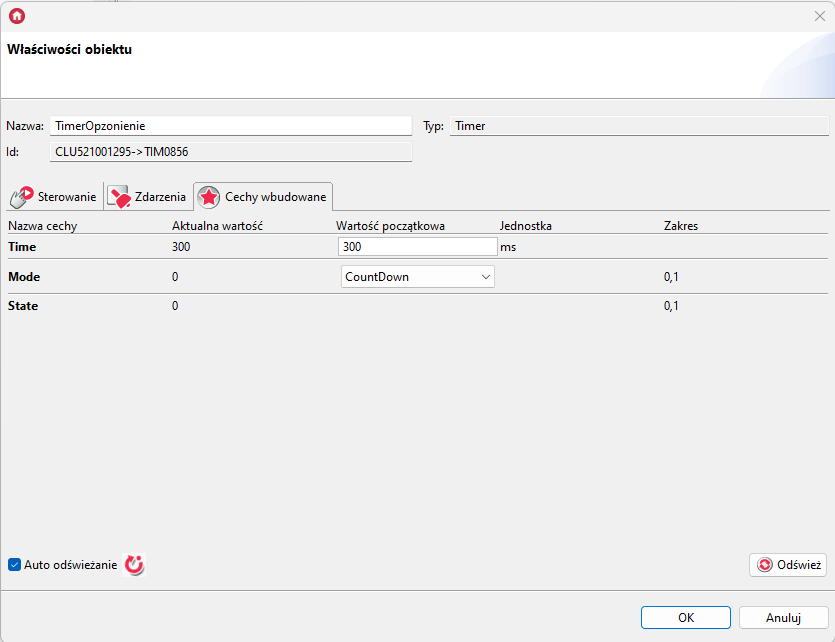
8\. Wpisujemy nazwę obiektu: ***TimerOpzonienie*** i uzupełniamy wartości cech wbudowanych obiektu:
**Tworzenie skryptów**
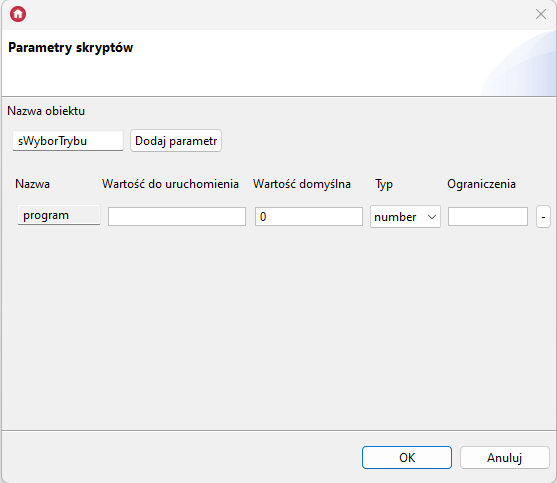
1\. Dodaj skrypt ***sWyborTrybu***
Dodaj parametr skryptu o nazwie ***program*** i typie ***number***
Wklej poniższą treść skryptu:
```
local path = "/Player?2?" .. program HTTP->WyborTrybu_Request->SetPath(path)HTTP->WyborTrybu_Request->SendRequest()
```
2\. Dodaj skrypt ***sZmianaJasnosci***
Dodaj parametr skryptu o nazwie ***jasnosc*** i typie ***number***
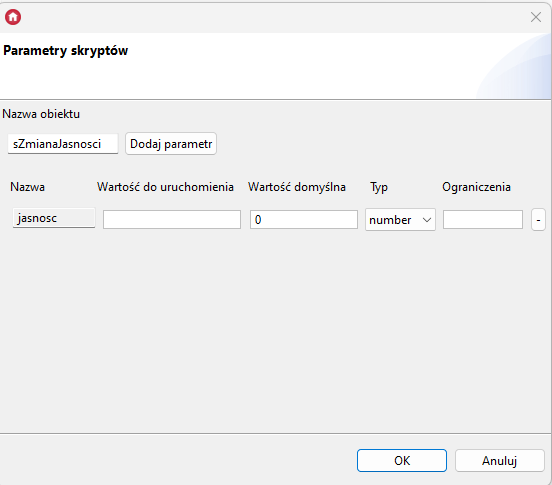
Wklej poniższą treść skryptu:
```
local path = "/Player?4?" .. jasnoscHTTP->ZmianaJasnosci_Request->SetPath(path)HTTP->ZmianaJasnosci_Request->SendRequest()
```
3\. Dodaj skrypt ***sOdczytStanu***
Wklej poniższą treść skryptu:
```
local data = HTTP->OdczytStanu->ResponseBodyHTTP->WybranyProgram = string.match(data, "%d+")HTTP->Jasnosc = string.match(data, "%,(%d+)")
```
**Przypisanie skryptów do obiektów**
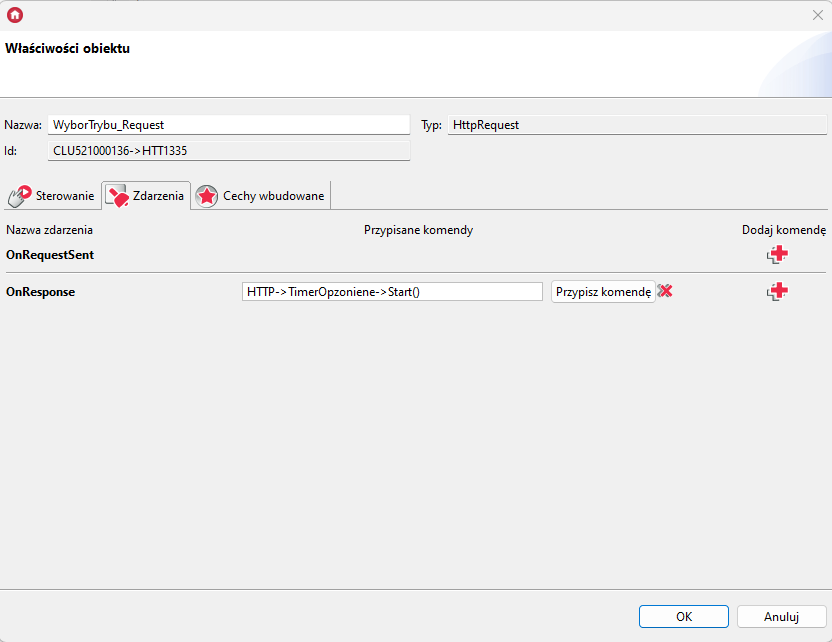
1\. Do zdarzenia ***OnResponse***obiektu***WyborTrybu\_Request*** przypisz metodę ***Start()*** obiektu wirtualnego ***TimerOpoznienie**:*
**
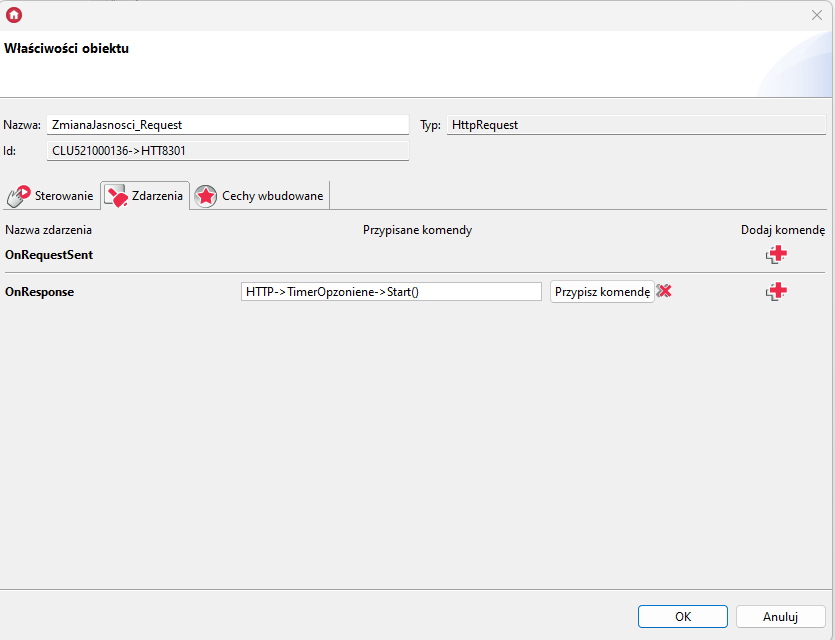
2\. Do zdarzenia ***OnResponse*** obiektu***ZmianaJasnosci\_Request*** przypisz metodę ***Start()*** obiektu wirtualnego ***TimerOpoznienie**:*
3\. Do zdarzenia ***OnResponse*** obiektu***OdczytStanu*** przypisz skrypt ***sOdczytStanu()**.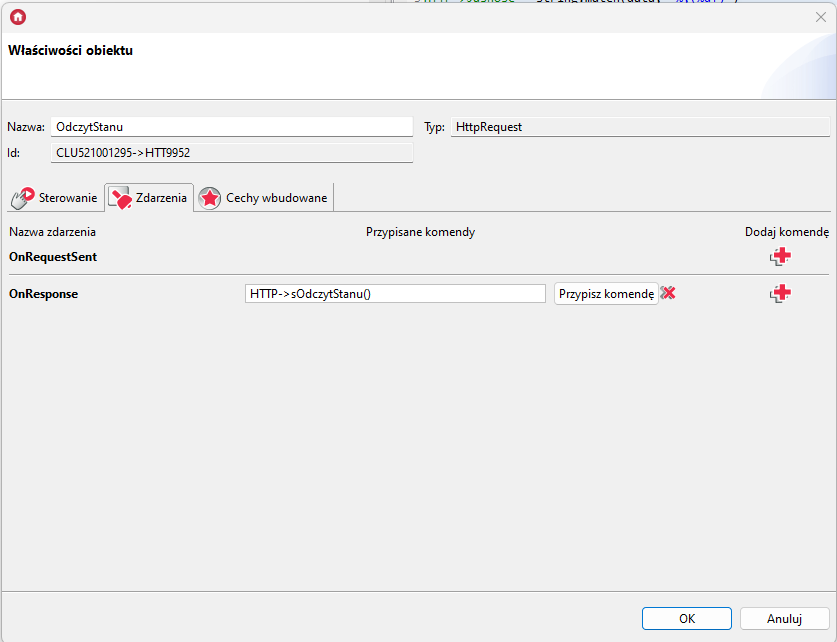*
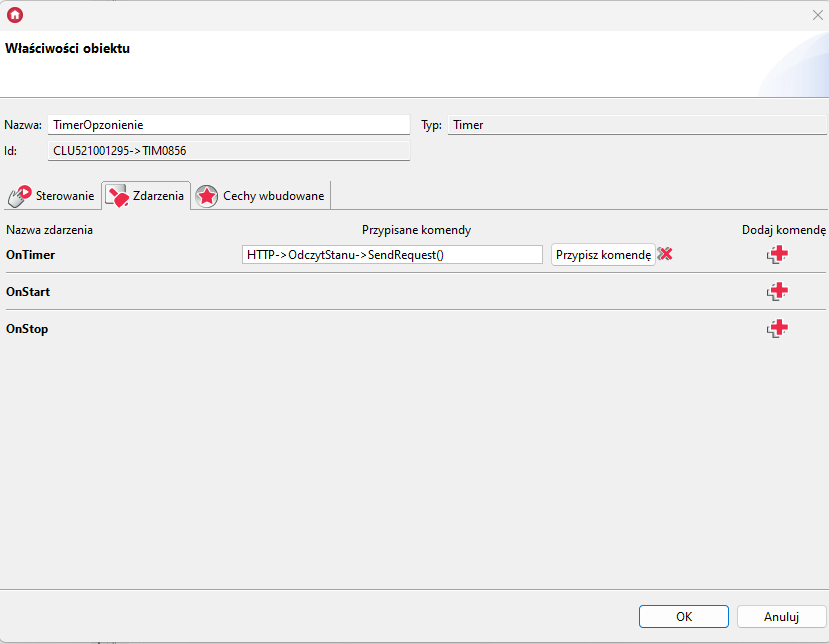
4\. Do zdarzenia ***OnTimer*** obiektu***TimerOpzonienie*** przypisz metodę **SendRequest()**obiektu wirtualnego ***OdczytStanu**:*
**Sterowanie modułem**
Aby włączyć zaprogramowaną scene, należy wywołać skrypt ***sWyborTrybu*** z parametrem określającym numer programu*.* Można to zrobić np. za pomocą widżetu scena. Widżet ten należy skonfigurować w następujący sposób:
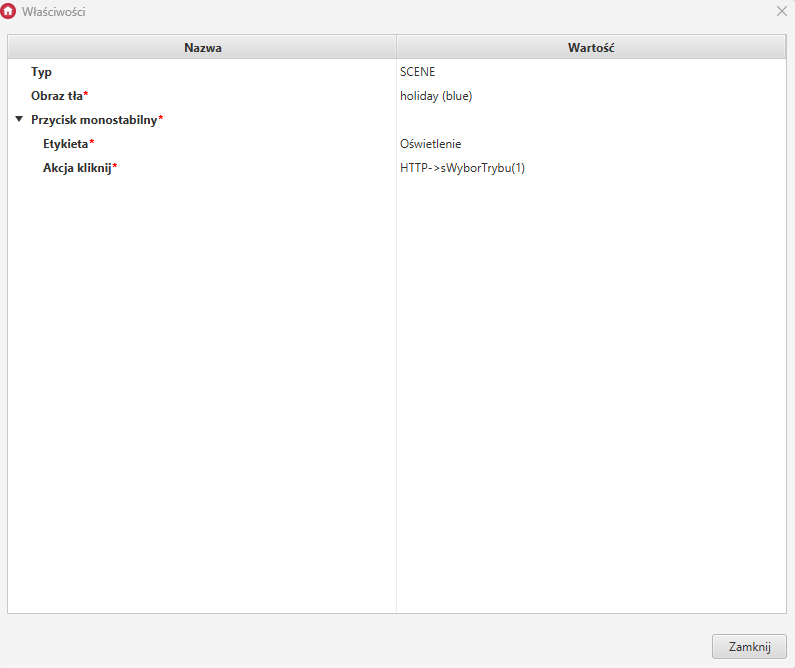
Dzięki takiej konfiguracji możemy uruchomić wcześniej zapisany na module program.
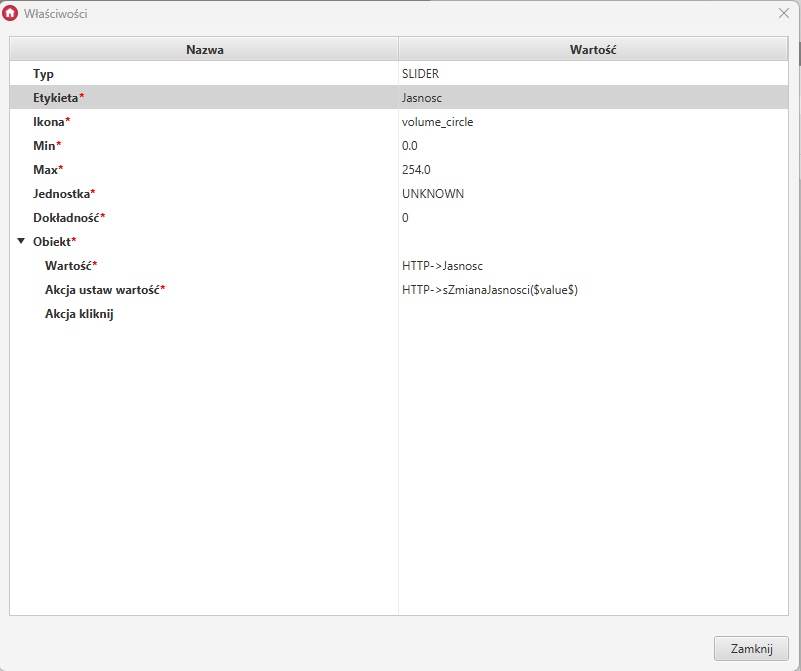
W celu sterowania jasnością należy wywołać skrypt ***sZmianaJasnosci*** z wartością parametru jaką chcemy ustawić. Można to zrobić np. przez widżet suwak. Widżet ten należy skonfigurować w następujący sposób:
- [Wytyczne instalacyjne](https://knowledgebase.grenton.com/pl/wytyczne-instalacyjne?hsLang=pl#main-content)
- [Jak Wykonać Instalację Elektryczną](https://knowledgebase.grenton.com/pl/wytyczne-instalacyjne?hsLang=pl#jak-wykona%C4%87-instalacj%C4%99-elektryczn%C4%85)
- [Urządzenia referencyjne](https://knowledgebase.grenton.com/pl/urz%C4%85dzenia-referencyjne?hsLang=pl#main-content)
- [Zintegrowane urządzenia](https://knowledgebase.grenton.com/pl/urz%C4%85dzenia-referencyjne?hsLang=pl#zintegrowane-urz%C4%85dzenia)
- [Najczęstsze Błędy](https://knowledgebase.grenton.com/pl/najcz%C4%99stsze-b%C5%82%C4%99dy?hsLang=pl)
- [Instalacja Elektryczna](https://knowledgebase.grenton.com/pl/instalacja-elektryczna?hsLang=pl)
- [Konfiguracja i Integracje](https://knowledgebase.grenton.com/pl/konfiguracja-i-integracje?hsLang=pl#main-content)
- [Gate Modbus](https://knowledgebase.grenton.com/pl/konfiguracja-i-integracje?hsLang=pl#gate-modbus)
- [Videoszkolenia](https://knowledgebase.grenton.com/pl/konfiguracja-i-integracje?hsLang=pl#videoszkolenia)
- [Aplikacje](https://knowledgebase.grenton.com/pl/konfiguracja-i-integracje?hsLang=pl#aplikacje)
- [Gate HTTP](https://knowledgebase.grenton.com/pl/konfiguracja-i-integracje?hsLang=pl#gate-http)
- [Smart Panel](https://knowledgebase.grenton.com/pl/konfiguracja-i-integracje?hsLang=pl#smart-panel)
- [Konfiguracja](https://knowledgebase.grenton.com/pl/konfiguracja-i-integracje?hsLang=pl#konfiguracja)
- [Interfejsy myGrenton](https://knowledgebase.grenton.com/pl/konfiguracja-i-integracje?hsLang=pl#interfejsy-mygrenton)
- [Obiekty wirtualne](https://knowledgebase.grenton.com/pl/konfiguracja-i-integracje?hsLang=pl#obiekty-wirtualne)
- [Gate Alarm](https://knowledgebase.grenton.com/pl/konfiguracja-i-integracje?hsLang=pl#gate-alarm)
- [Domofon](https://knowledgebase.grenton.com/pl/domofon?hsLang=pl)
- [Najczęściej Zadawane Pytania](https://knowledgebase.grenton.com/pl/najcz%C4%99%C5%9Bciej-zadawane-pytania?hsLang=pl#main-content)
- [FAQ](https://knowledgebase.grenton.com/pl/najcz%C4%99%C5%9Bciej-zadawane-pytania?hsLang=pl#faq)
- [O Grenton](https://knowledgebase.grenton.com/pl/najcz%C4%99%C5%9Bciej-zadawane-pytania?hsLang=pl#o-grenton)
- [Cenniki i dokumenty](https://knowledgebase.grenton.com/pl/cenniki-i-dokumenty?hsLang=pl)
[](http://grenton.com)
Copyright © 2026, Grenton Sp.z o.o.
```json
{
"@context" : "https://schema.org",
"@type" : "VideoObject",
"contentUrl" : "https://19862392.fs1.hubspotusercontent-na1.net/hubfs/19862392/Efekt1.mp4",
"dateModified" : "2023-08-18T11:38:06.630Z",
"duration" : "PT5S",
"height" : 1080,
"name" : "Efekt1",
"thumbnailUrl" : "https://19862392.fs1.hubspotusercontent-na1.net/hubfs/19862392/Efekt1.mp4/medium.jpg",
"uploadDate" : "2023-08-18T11:37:59.275Z",
"width" : 1920
}
```
```json
{
"@context" : "https://schema.org",
"@type" : "VideoObject",
"contentUrl" : "https://19862392.fs1.hubspotusercontent-na1.net/hubfs/19862392/Efekt2.mp4",
"dateModified" : "2023-08-18T11:37:48.731Z",
"duration" : "PT4.734S",
"height" : 1080,
"name" : "Efekt2",
"thumbnailUrl" : "https://19862392.fs1.hubspotusercontent-na1.net/hubfs/19862392/Efekt2.mp4/medium.jpg",
"uploadDate" : "2023-08-18T11:37:41.327Z",
"width" : 1920
}
```
```json
{
"@context" : "https://schema.org",
"@type" : "VideoObject",
"contentUrl" : "https://19862392.fs1.hubspotusercontent-na1.net/hubfs/19862392/Efekt3.mp4",
"dateModified" : "2023-08-18T11:36:03.553Z",
"duration" : "PT4.734S",
"height" : 1080,
"name" : "Efekt3",
"thumbnailUrl" : "https://19862392.fs1.hubspotusercontent-na1.net/hubfs/19862392/Efekt3.mp4/medium.jpg",
"uploadDate" : "2023-08-18T11:35:55.959Z",
"width" : 1920
}
```